
Best Business Process Automation Tools in 2026 (+ How to Choose, Implement & Measure ROI)
The global business process automation market is projected to more than double, from $22.45 billion in 2026 to $54.34 billion by 2032. That kind of growth doesn't happen by accident. It's fueled by businesses of every size discovering that the manual work their teams do every day (the data entry, the approval chasing, the report pulling) is quietly draining their budgets and burning out their best people.
AI workflow automation systems built with the right tools can change that overnight. They connect your apps, orchestrate your workflows, and let your team focus on the work that requires a human brain. But with dozens of platforms competing for your attention across iPaaS, RPA, and no-code categories, choosing the right one can feel overwhelming.
This guide breaks down the 12 best business process automation tools, compares them on features, pricing, and real-world use cases, and then walks you through how to choose, implement, and measure the ROI of whichever platform you pick. Whether you're exploring ways to automate repetitive tasks or building a more sophisticated workflow automation strategy, this list covers the tools that can get you there.
The Real Cost of Manual Work
Before diving into tools, it's worth understanding exactly what you're solving for. Manual workflows aren't slow. They're expensive in ways that don't always show up on a balance sheet.
- Persistent bottlenecks. Work grinds to a halt because it's all waiting on one person's approval or input, creating a massive slowdown for everyone else down the line.
- Costly human error. A simple typo during data entry or a forgotten step in a complex process can snowball into huge financial or reputational damage. Some studies show that up to 60% of invoices require some kind of correction.
- Wasted employee time. Your most talented people end up spending hours on copy-paste jobs and administrative busywork instead of driving growth and innovation.
Here's a quick side-by-side to put the difference in perspective:
| Factor | Manual Process | Automated Process |
|---|---|---|
| Speed | Hours to days per task | Seconds to minutes |
| Accuracy | Prone to human error | Rules-based, consistent every time |
| Scalability | Requires more headcount | Handles increased volume without extra staff |
| Visibility | Scattered across inboxes and spreadsheets | Centralized dashboards and audit trails |
| Cost trajectory | Grows linearly with volume | Stays flat or decreases per unit |
One critical thing to keep in mind: 73% of failed automation projects happen because teams automate a broken process instead of fixing it first. Before you hand any workflow to a machine, take the time to map it out, simplify it, and remove unnecessary steps. Automation makes a good process great, but it also makes a bad process fail faster.
How to Choose the Right Business Process Automation Tool
The market is crowded with options, and every vendor will tell you their tool is the best. Instead of getting pulled into feature-comparison paralysis, focus on the capabilities that genuinely separate a useful platform from expensive shelfware, then match those capabilities against your specific needs.
Here are some key questions to ask when evaluation the tools.
Is it a visual builder?
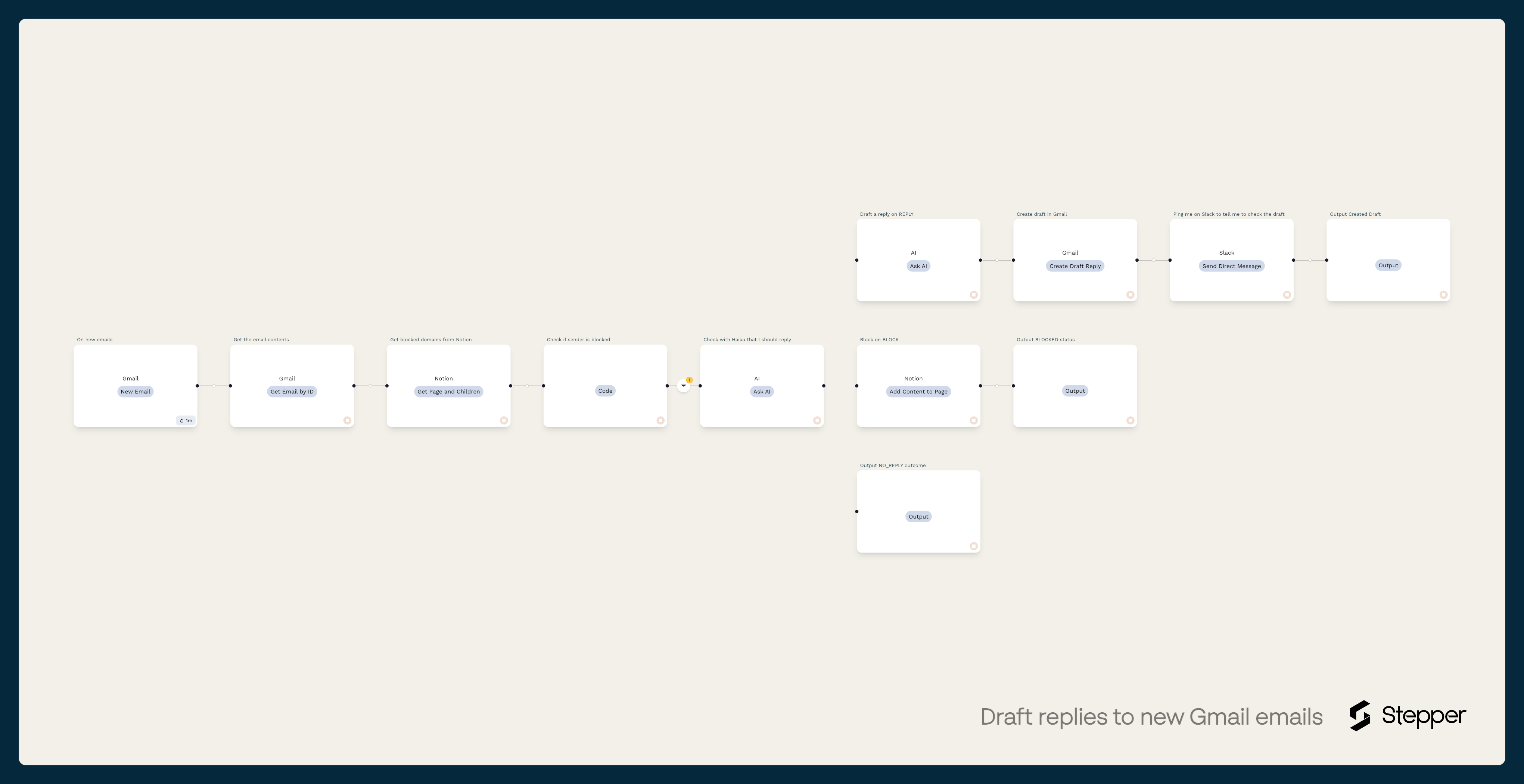
This is the non-negotiable starting point. Not long ago, building any kind of automation meant writing code, which created a gap between the people who understood the business process and the developers who had to translate it into a script. Today's best platforms close that gap with intuitive, drag-and-drop interfaces that let you map out a process the same way you would on a whiteboard.
A good visual editor is more than a building tool. It becomes living documentation for your business. Anyone can look at the canvas and instantly understand how work gets done, making training easier, troubleshooting faster, and improvement opportunities visible.
Does it integrate with your apps?
An automation platform that can't talk to your other software is useless. Your BPA tool needs to connect with the apps you already rely on every day: your CRM (Salesforce, HubSpot), your communication tools (Slack, Gmail, Teams), your project management boards (Asana, Notion), and your finance stack (QuickBooks, Stripe, NetSuite).
But connecting your apps isn't enough on its own. The platform needs conditional logic to make those connections intelligent. This is the "if-then" brainpower that allows your automations to make decisions. For example: If a new lead's company size is over 500, then assign it to the enterprise sales team and send a high-priority alert. Without it, your workflows are one-track robots.
Does it offer reusable components?
Think about how many of your workflows need the same building blocks: authenticate with Google, look up a customer in your database, format a date, validate an email address. Platforms that let you build a piece of logic once, save it, and drop it into any future workflow save massive amounts of time. It's a "design once, use everywhere" philosophy that makes your automation library much easier to scale and maintain.
Is it secure and compliant?
When you're connecting tools that hold sensitive customer and company data, security can't be an afterthought. Any platform worth considering should support:
- OAuth 2.0 for secure authorization without sharing passwords.
- Encrypted API key management so credentials are stored safely.
- Data encryption both in transit and at rest.
- Audit trails that log every action for compliance purposes.
Who will build the automations?
If the answer is your non-technical marketing, sales, or support teams, you need an intuitive, user-friendly interface. A conversational or visual editor (like Stepper's or Make's) is far more approachable than a code-heavy platform like Pipedream or n8n.
How complex are your processes?
Are you connecting two apps with a simple "if this, then that" trigger? Or are you building multi-step workflows with conditional logic, branching paths, and data transformations? Tools like Zapier excel at the former. Platforms like Stepper and Make are better equipped for the latter without a massive price jump. For enterprise-scale orchestration across dozens of systems, Workato or Tray.io may be worth the investment.
What is your budget, and how does pricing scale?
Pay close attention to pricing models. A low entry price can be misleading if you'll quickly hit a "task" or "operation" limit. Evaluate how pricing grows alongside your usage. This is a key advantage of platforms like Stepper, which offer a generous model that doesn't penalize you for building successful, high-volume workflows.
How important is reusability?
Do you find yourself rebuilding the same logic for different workflows? This is a hidden time-sink. Tools that emphasize reusable components (a core tenet of Stepper) allow you to build a standardized, low-maintenance automation library. You build a process once and reuse it everywhere, saving significant development and troubleshooting time.
The 12 Best Business Process Automation Tools in 2026
1. Stepper
Stepper distinguishes itself by grounding its entire platform in an AI-native, conversational approach. Instead of requiring users to manually assemble complex visual pipelines, Stepper lets teams describe their desired workflow in natural language. Its built-in AI assistant translates the request into a functional, visual automation that can then be fine-tuned using a clear drag-and-drop editor. This hybrid model significantly lowers the barrier to entry while still giving experienced builders full control.
What makes it different: Stepper's emphasis on reusable components is its standout feature. You design a specific piece of logic once (an authentication flow, a data lookup, a complex transformation) and deploy it across any number of workflows. Combined with Skill Sets that bundle components for specific roles or teams, this prevents redundant work and simplifies maintenance, a common pain point with other automation platforms.
Key Features and Use Cases
- AI Conversational Editor: Build and modify automations by talking to an AI assistant. Ideal for rapid prototyping and users without a technical background.
- Reusable Components & Skill Sets: Standardize common tasks (e.g., API authentication, data formatting) into shareable blocks to ensure consistency and speed up workflow creation.
- Extensive Integrations: Connects with over 113 applications, including essentials like Google Workspace, Slack, HubSpot, Stripe, and major AI models from OpenAI and Anthropic.
- Ready-Made Templates: Pre-built solutions for tasks like AI-powered email drafting, OCR invoice processing, and CRM data enrichment.
Pricing
- Free Plan: Unlimited workflows, 200 steps/month, and 5,000 free credits to experiment with premium features.
- Pro Plan: $19/month for unlimited steps (subject to a fair-use policy), 15,000 free credits, and the ability to purchase extra credits. You can also bring your own API keys for services like OpenAI or Gmail, giving you direct control over costs for high-volume tasks.
2. Zapier
Zapier is one of the most recognized and accessible business process automation tools, acting as a digital middleman that connects thousands of different web applications. It operates on a simple "trigger and action" model: when a specific event happens in one app, Zapier automatically performs a predefined task in another.
What makes it different: Zapier's unmatched app directory is its superpower. With connections to over 7,000 apps, it has the broadest ecosystem of any platform on this list, making it the safest bet if you use niche or specialized tools that smaller platforms haven't built connectors for yet. While Zapier excels at straightforward, linear automations between two apps, Stepper differs in what happens between the trigger and the action, where AI can analyze, score, classify, and generate content within the workflow itself.
Key Features and Use Cases
- Massive App Ecosystem: Connect over 7,000 apps, more than almost any other platform.
- Built-in Tools: Use Zapier Tables to store data, Forms to collect it, and an AI Copilot to help build workflows.
- Use Case (Marketing): Automatically add new lead magnet sign-ups from a landing page to your CRM and an email marketing campaign.
- Use Case (Operations): When a project task is marked "complete" in Asana, send a notification to a specific Slack channel.
Pricing
- Free Plan: 100 tasks/month for single-step Zaps.
- Paid Plans: Start at $19.99/month (billed annually) for 750 tasks and multi-step Zaps.
3. Make
Make positions itself as a powerful visual automation platform where users build workflows called "scenarios." Instead of a linear trigger-action model, Make provides a drag-and-drop canvas that allows for complex logic with multiple paths, routers, and iterators.
What makes it different: Make's visual representation of data flow is unmatched for complexity. You can see exactly how information moves between app modules, with routers to split paths, iterators to process arrays, and aggregators to merge data back together. This makes it the strongest choice for operations professionals who need granular control over data mapping and error handling. Unlike traditional platform constraints, Make shines for teams that need that level of visual debugging and flexibility.
Key Features and Use Cases
- Visual Scenario Builder: Drag and drop apps onto a canvas and connect them to build multi-step workflows with branching logic.
- Advanced Data Handling: Includes routers to split paths, iterators to process arrays, and aggregators to merge data back together.
- Use Case (Operations): Parse a CSV file from an email attachment, iterate through each row, and create or update records in a database.
- Use Case (Finance): When a new invoice is created in Stripe, create a corresponding record in QuickBooks and send a backup copy to Google Drive.
Pricing
- Free Plan: 1,000 operations/month for two active scenarios.
- Paid Plans: Start at $9/month (billed annually) for 10,000 operations and unlimited active scenarios.
4. Microsoft Power Automate
Microsoft Power Automate is an enterprise-grade platform designed for organizations deeply invested in the Microsoft ecosystem. It functions as a bridge between Microsoft 365, Dynamics 365, Azure, and hundreds of other services, and supports both cloud-based API automation and on-premise Robotic Process Automation (RPA) through its desktop flows.
What makes it different: Native integration with SharePoint, Teams, and Outlook makes Power Automate feel built-in rather than bolted-on. The inclusion of AI Builder (for form processing, object detection, and sentiment analysis) and process mining capabilities provides a pathway to more intelligent automation that few competitors in the Microsoft-adjacent space can match.
Key Features and Use Cases
- Cloud & Desktop Flows: Build API-based automations in the cloud or record user actions on the desktop for RPA tasks.
- AI Builder: Integrate AI models directly into your workflows for form processing, object detection, or sentiment analysis.
- Use Case (Operations): Automatically create a new SharePoint list item when an email with a specific subject arrives in a shared Outlook inbox.
- Use Case (IT/Admin): When a new user is added to Azure Active Directory, trigger a flow to assign licenses and send a welcome packet via Teams.
Pricing
- Limited Free Use: Included with many Microsoft 365 licenses for standard connector use.
- Paid Plans: Start at $15 per user/month for unlimited flows. Separate licenses required for premium connectors, AI Builder credits, and unattended RPA bots.
5. UiPath
UiPath moves from simple app-to-app connections into the world of Robotic Process Automation (RPA). It specializes in building software "robots" that mimic human actions on a computer: logging into applications, moving files, extracting data from documents, and filling in forms. This makes it ideal for automating legacy systems and complex, rule-based tasks where direct API integrations are not possible.
What makes it different: UiPath's Intelligent Document Processing (IDP) uses AI to extract, interpret, and process data from invoices, purchase orders, and other unstructured documents, going far beyond what template-based extraction can handle. Combined with its Orchestrator for monitoring and Action Center for human-in-the-loop exceptions, it's built for high-stakes, governed automation at enterprise scale.
Key Features and Use Cases
- Attended & Unattended RPA: Deploy bots that work alongside employees (attended) or run independently on a schedule in the background (unattended).
- Intelligent Document Processing (IDP): Use AI to extract, interpret, and process data from invoices, purchase orders, and other unstructured documents.
- Use Case (Finance): Automate the accounts payable process by having a bot read incoming invoices, extract key details, enter them into an ERP system, and flag exceptions.
- Use Case (IT/Operations): Automate user onboarding by creating accounts across multiple systems, granting permissions, and sending welcome emails.
Pricing
- Free Plan: Free edition with limited capabilities for individual users and small teams.
- Paid Plans: Enterprise pricing is quote-based and requires engaging with the sales team.
6. Automation Anywhere
Automation Anywhere is an enterprise-grade RPA platform designed for automating complex, large-scale business operations. Its cloud-native Automation 360 platform creates digital bots that interact with user interfaces and back-end systems to execute repetitive tasks.
What makes it different: Automation Anywhere's centralized Control Room provides a level of governance that smaller platforms can't match: role-based access control, detailed audit logs, and centralized management of both attended and unattended bots. Recent additions include generative AI for workflow creation and advanced intelligent document processing, making it one of the most forward-looking enterprise RPA platforms.
Key Features and Use Cases
- Centralized Governance: The Control Room offers granular management, role-based access control, and detailed audit logs.
- Intelligent Automation: Combines RPA with AI capabilities for document processing and process discovery.
- Use Case (Finance): Automate invoice processing by extracting data from PDFs, validating it against a database, and entering it into an ERP system.
- Use Case (HR): Streamline employee onboarding by creating user accounts, assigning permissions, and scheduling orientation meetings across multiple systems.
Pricing
- Free Plan: Community Edition for small businesses and developers.
- Paid Plans: Pricing is primarily quote-based and tailored for enterprise needs.
7. Workato
Workato positions itself as an enterprise-grade Integration Platform as a Service (iPaaS) designed for complex, large-scale business process automation. It targets mid-market and enterprise organizations that need strong governance, security, and scalability.
What makes it different: Workato provides a single platform for both integration and automation, complete with DevOps-style controls. Its recipe lifecycle management, dependency graphs, and detailed audit logs give IT and operations teams the oversight they need for business-critical workflows. The addition of AI orchestration and an embedded solution for SaaS vendors further cements its position for companies building automation at serious scale.
Key Features and Use Cases
- Enterprise Governance: Recipe lifecycle management, dependency graphs, and detailed audit logs.
- Extensive Connectivity: Over 10,000 pre-built connectors and a Connector SDK for building custom integrations.
- Use Case (Finance/IT): Automate the procure-to-pay process by integrating ERP systems like NetSuite with procurement platforms like Coupa and communication tools like Slack.
- Use Case (GTM): Build a lead-to-account matching and routing engine that syncs data between Marketo, Salesforce, and internal databases.
Pricing
- Free Plan: No free-forever plan, but a free trial is available.
- Paid Plans: Quote-based and customized for enterprise needs, typically starting at a much higher price point than SMB-focused tools.
8. Tray.io
Tray.io is a low-code, enterprise-grade automation platform built for creating complex, multi-system workflows and managing large-scale data integrations. It excels in environments where governance, scalability, and security are paramount.
What makes it different: Tray.io is purpose-built for revenue operations and product operations teams that need to orchestrate data flows between hundreds of applications. Its advanced visual builder supports conditional branching, looping, and error handling. Its architecture handles high-volume data movement while maintaining strict compliance controls, a combination that makes it a go-to for technical teams managing business-critical integrations.
Key Features and Use Cases
- Advanced Visual Builder: Create intricate workflows with branching logic, loops, and data-mapping tools.
- Enterprise Governance: Environments for development/testing/production, version control, and audit logs.
- Use Case (Revenue Operations): Automate lead routing and scoring by syncing data between Marketo, Salesforce, and a data warehouse like Snowflake.
- Use Case (Product): When a new user signs up in-app, trigger a sequence that creates a customer record in a CRM and sends a personalized welcome email via an ESP.
Pricing
- Free Plan: Free trial available upon request.
- Paid Plans: Quote-based and tailored to usage, connector needs, and support levels. Generally higher than SMB-focused tools.
9. n8n
n8n is a powerful, source-available, node-based platform that brings a developer-friendly approach to business process automation. Users create complex workflows by visually connecting different nodes, each representing an app integration or a logical function.
What makes it different: n8n's deployment flexibility is its killer feature. You can run it on your own servers for maximum control and data privacy, bypassing the per-task pricing models of other tools entirely, or opt for the managed cloud service for convenience. This makes it ideal for companies with strict data residency requirements or those who want to eliminate usage-based costs at scale. Compared to Stepper, n8n appeals more to teams that prioritize self-hosting and customization over conversational, AI-driven workflow building.
Key Features and Use Cases
- Node-Based Visual Editor: Build workflows by connecting 400+ app nodes and logic helpers for branching, merging, and error handling.
- Flexible Deployment: Choose between a fully managed cloud version or a self-hosted option for greater control and potential cost savings.
- Use Case (Data Processing): Pull data from a database, process it through a custom JavaScript node, and push formatted results to Google Sheets and a BI tool.
- Use Case (DevOps): Automate incident response by creating a workflow that triggers on a monitoring alert, creates a Jira ticket, and pings the on-call engineer in Slack.
Pricing
- Free Plan: The self-hosted Community Edition is free and fully featured.
- Paid Plans: Cloud plans start at $20/month for 2,500 workflow executions. Self-hosted Pro plans with enterprise features have custom pricing.
10. Pipedream
Pipedream is a developer-centric automation platform that bridges the gap between no-code simplicity and full-code power. It enables users to build event-driven workflows using a mix of pre-built app integrations and custom code steps written in Node.js, Python, Go, and Bash.
What makes it different: Pipedream's serverless execution model allows engineers to run code without managing infrastructure. You can connect to any HTTP-based API, use npm and PyPI packages directly within your workflows, and manage secrets securely. This makes it the most powerful option for technical operations and growth engineering teams that need to build bespoke internal tools, not string together two SaaS apps.
Key Features and Use Cases
- Code-Level Control: Write custom Node.js or Python steps with full access to npm and PyPI package libraries.
- Event-Driven & Serverless: Workflows are triggered by webhooks, app events, or schedules and run in a scalable serverless environment.
- Use Case (Engineering): Create a custom webhook endpoint to receive data from a proprietary system, process it with a Python script, and load it into a data warehouse.
- Use Case (RevOps): When a high-value deal is created in a CRM, trigger a workflow that queries a third-party data enrichment API and updates the contact record.
Pricing
- Free Plan: A generous free tier with a monthly credit allowance for personal projects and testing.
- Paid Plans: Start at $29/month for more credits, increased concurrency, and team features.
11. Kissflow
Kissflow is a unified low-code/no-code platform designed for business teams to automate workflows, manage processes, and build custom applications without deep technical knowledge. It shines in environments that require strong governance and control over processes like procurement, employee onboarding, and finance approvals.
What makes it different: While most tools on this list focus on connecting apps, Kissflow focuses on end-to-end process management with built-in governance. It provides a structured environment where business leaders can create, oversee, and report on complex, multi-step human-centric workflows, complete with role-based access controls, audit trails, and SLA tracking. If your biggest pain points involve approval chains and compliance rather than app integrations, Kissflow is built for you. No-code automation tools like Kissflow and Pipefy have become go-to choices for teams prioritizing ease of use over advanced data transformation.
Key Features and Use Cases
- Visual Process Builder: Create complex approval sequences and business rules with a drag-and-drop workflow designer.
- Granular Governance: Implement role-based access controls, create audit trails, and track SLA performance.
- Use Case (HR): Automate the entire employee onboarding process, from offer letter approval and IT provisioning requests to first-day orientation tasks.
- Use Case (Finance): Manage procurement by creating a system for purchase requisitions, vendor approvals, and invoice processing.
Pricing
- Free Plan: Not publicly available. Requires a demo or trial request.
- Paid Plans: Pricing is quote-based and tailored to company size and feature needs.
12. Pipefy
Pipefy is a process management and automation platform built for operations teams in Procurement, Finance, HR, and Customer Ops. It combines a visual, Kanban-style workflow editor with powerful business-specific features, allowing non-technical users to design, deploy, and automate their departmental procedures.
What makes it different: Pipefy's focus on packaged, department-specific solutions sets it apart. Instead of starting from scratch, teams can deploy pre-built templates for things like purchase requisitions or employee onboarding that already include relevant fields, phases, and automation rules. Combined with public or private intake forms that act as a single entry point for all requests, Pipefy standardizes operations and enforces compliance without requiring extensive developer resources.
Key Features and Use Cases
- Visual Workflows & Templates: Build and modify processes using a drag-and-drop interface with pre-built solutions for specific departments.
- Forms & Portals: Create public or private forms to centralize intake and ensure data is complete from the start.
- Use Case (Finance): Automate the accounts payable process, from invoice submission via a portal to multi-level approvals and payment notifications.
- Use Case (HR): Manage the entire employee onboarding workflow, automatically assigning tasks to IT, HR, and hiring managers as a new hire moves through each stage.
Pricing
- Free Plan: Available for small teams with core features.
- Paid Plans: Start at $23/user/month (billed annually) for more advanced automations, integrations, and templates.
How to Implement BPA: A Step-by-Step Roadmap
The most common mistake is trying to automate your entire business on day one. The most successful teams start small, prove value, and iterate. Here's a six-step roadmap to get you there.
Step 1: Start with Quick Wins
The best workflow automations ideas to start with are all high-impact but low-complexity, the small, repetitive jobs that everyone hates doing but are relatively simple to define. Great starting points include:
- Automatically assigning new leads from your website to the right salesperson based on territory or industry.
- Generating a weekly marketing report that pulls data from Google Analytics and your social media accounts.
- Sending automated reminders to new hires who haven't completed their onboarding forms.
Getting a few of these small victories under your belt proves the concept to skeptics and gets your team excited about what's next.
Step 2: Fix the Process First, Then Automate It
Before you build anything, grab a whiteboard and sketch out the entire workflow step by step. Where does it start? What decisions need to be made along the way? Who gets notified? What happens when something goes wrong?
This blueprinting phase is critical. It helps you spot gaps, remove unnecessary steps, and simplify the process before you've invested hours automating something broken. Remember that 73% stat. Don't automate a mess.
Step 3: Choose the Right Platform
Your tool choice should be directly tied to the problem you're trying to solve and the people who'll be solving it. Use the framework from the section above to match your needs with the right category of tool.
Step 4: Build Your Workflow
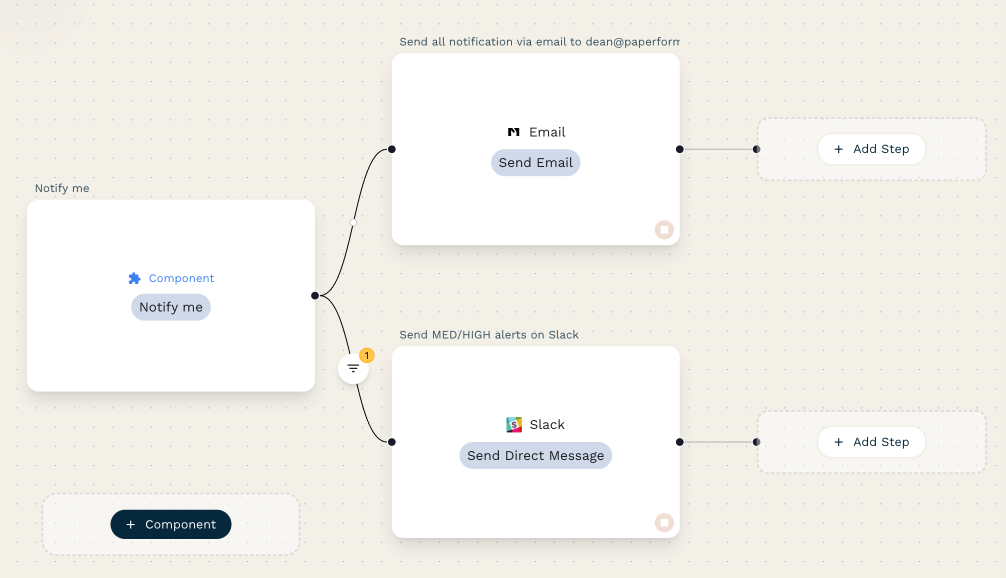
With a clear map and the right platform, move into the visual builder. Good tools make this feel like putting together building blocks. You'll drag and drop triggers (like "New Email Received") and connect them to a series of actions (like "Add Attachment to Google Drive" and "Create Task in Asana").
If your platform supports reusable components, start building your library from day one. That first authentication flow or data-formatting block you save will pay dividends across every workflow you create after it.
Step 5: Test Ruthlessly, Then Deploy
Your first draft of a workflow will almost never be perfect. Before you roll it out, test everything. What happens if a form is submitted with missing information? What if an approval request is denied? Try to break it.
Start with a limited rollout. Deploy the automation for a single user or a small group first. This lets you catch unexpected quirks in a low-risk environment before the whole team depends on it.
Step 6: Monitor, Gather Feedback, and Optimize
After going live, watch the dashboards. How many times did the workflow run? What's the average completion time? Did any errors pop up? These numbers confirm you're getting the benefits you expected and often reveal opportunities to make the process even better.
Then check in regularly with the people who are directly affected by the automation. Their on-the-ground feedback will help you fine-tune existing workflows and point you toward the next great automation opportunity.
How to Calculate Your ROI
"Improved efficiency" doesn't get a budget approved. To get buy-in for automation, or to expand an existing program, you need to draw a straight line from your BPA tools to hard numbers.
What to Track
- Hours saved per month. Calculate the time a task used to take manually, compare it to the automation's runtime, and multiply by how often the process runs. This is the easiest win and often the most powerful metric.
- Reduction in error rates. Track before-and-after error rates for data entry, financial reporting, or any process where mistakes have real costs.
- Faster response times. In sales and support, measure the time from when a new lead or support ticket is created to the moment the first action is taken.
- Increased process throughput. How much more can you do with what you have? Processing 2x more invoices or handling 3x the leads demonstrates your ability to scale without scaling payroll.
The Formula
A straightforward way to frame ROI:
A Quick Example
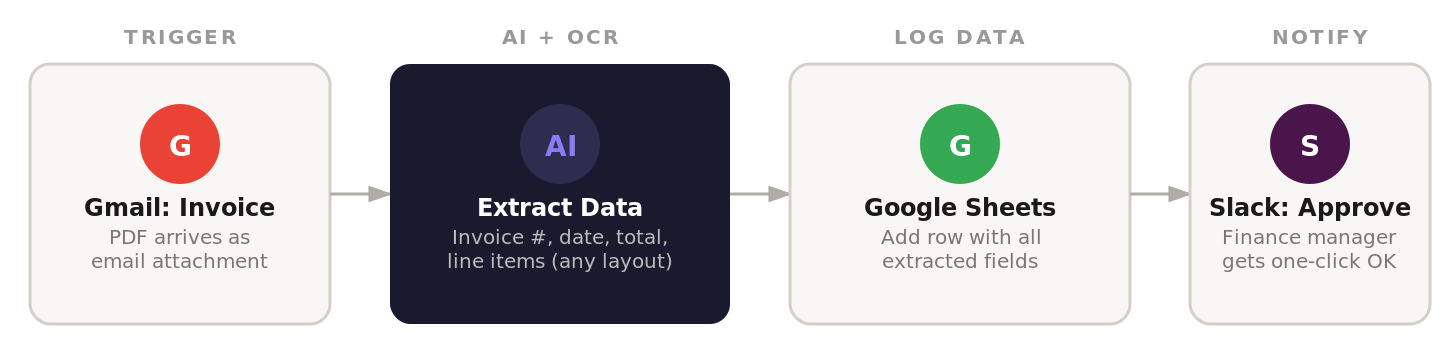
Take an accounts payable team that manually processes 500 invoices per month. Automating invoice processing typically looks like this:
- Labor savings: At 15 minutes per invoice, that's 125 hours/month. At a loaded hourly rate of $30, this manual work costs $3,750/month. Automation slashes that processing time dramatically.
- Early payment discounts: Many vendors offer a 2% discount for paying within 10 days. If you have $200,000 in monthly payables, capturing those discounts through fast, automated approvals adds $4,000/month to the bottom line.
- Eliminated late fees: Avoiding late payment penalties of 1.5% on that same $200,000 saves another $3,000/month.
In this one example, the monthly financial gain from a simple 4-step invoicing automation easily reaches $10,000+, making even the most expensive BPA tool on this list pay for itself many times over.
The story matters too. Automating tedious, repetitive tasks improves team morale, reduces burnout, and frees your best people for the strategic work that truly moves the needle. That's a return that goes far beyond any spreadsheet.
Frequently Asked Questions
What's the difference between BPA and RPA?
Robotic Process Automation (RPA) is a specialized bot trained to mimic human actions on a computer screen (clicking, typing, copying, pasting) to execute a single, repetitive task. Business Process Automation (BPA) orchestrates an entire sequence of events across different apps, teams, and departments. Many modern BPA platforms (like UiPath and Automation Anywhere) incorporate RPA capabilities, so you often get both in one tool.
What level of technical skill do I need to get started?
It depends on the tool. Platforms like Stepper, Zapier, and Kissflow are built for non-technical users, with visual editors and conversational AI that feel more like drawing a flowchart than writing code. Make and Pipefy reward some technical fluency. Tools like n8n, Pipedream, and the enterprise RPA platforms lean more technical. Your most valuable asset isn't a programming background. It's your firsthand knowledge of the business process you want to automate.
Which processes should I automate first?
Look for processes that are high-volume, repetitive, rule-based, and prone to human error. Classic starting points include data entry where you're copying information between systems, compiling routine weekly or monthly reports, and sending standardized follow-up emails. Start simple, prove value fast, and use that early success to get buy-in for bigger projects.
How do I keep my automations secure and compliant?
Choose a platform that supports OAuth 2.0 for authorization, encrypted credential storage for API keys, and data encryption in transit and at rest. Beyond the platform, establish clear internal governance: decide who can create and edit automations, use the built-in audit trails to maintain a compliance record, and verify the platform's adherence to relevant standards (SOC 2, GDPR, HIPAA) before committing.
How long does it take to see results from automation?
Simple automations (lead routing, report compilation, notification workflows) can be up and running within a single afternoon. More complex, multi-department workflows might take a few weeks to map, build, test, and refine. Most companies report meaningful ROI within 30-60 days of their first deployment, with the benefits accelerating as they scale.
Take the First Step
The most common mistake isn't choosing the wrong tool. It's waiting too long to start. Identify a single, high-impact, repetitive process that causes daily frustration. Automate that one task. Track the time saved, the errors eliminated, and the new capacity your team gains.
That first tangible win transforms automation from an abstract concept into an indispensable part of your operations. From there, you can expand with the confidence and experience gained from that initial success.
Build a free lead-routing or invoice-processing automation in Stepper and you'll have a working system in under 10 minutes. If you get stuck, drop into the Discord community, where the team usually replies within a few hours.