
AI Workflow Automation: Step-by-Step Use Cases & How to Get Started | Stepper
AI workflow automation is the use of artificial intelligence to run multi-step business processes from start to finish: reading data, making decisions, and taking action across your apps without human intervention.
When most people hear "automation," they think of simple, rule-based tasks. If this happens, then do that. But AI workflow automation works differently. It gives your business processes a brain. Unlike basic "if this, then that" automations, AI workflows can understand language, score leads, draft emails, extract invoice data, and route support tickets based on sentiment, not keywords.
TL;DR
| What it is | Software that connects your apps and uses AI to automate complex, multi-step business processes, not simple triggers |
| Why it matters | Businesses using AI automation report 35% lower operational costs, 40-75% fewer errors, and 25-30% faster processes |
| Top tools | Stepper (AI-native, conversational builder, free plan), n8n (open-source), Zapier (legacy + AI add-ons), Make (visual-first) |
| Best starting point | Pick one repetitive, high-volume task → build it in Stepper using plain English → measure time saved → scale from there |
How AI Workflow Automation Works
To understand what makes AI workflow automation different, it helps to peek under the hood. The easiest way to think about it is like a digital team member with three parts: a brain, a nervous system, and hands. All three work together in a loop. Information comes in, the system thinks about it, and then it takes action.
The Brain: AI Models
Large language models (LLMs) do the thinking. When new data arrives (a lead from your website, a support email, an invoice PDF), the AI analyzes context, intent, and sentiment to decide what should happen next.
Example: An AI reads a support ticket and recognizes it's a critical billing issue from a frustrated, high-value customer. It flags it as urgent and routes it to a senior support manager. Not because of a keyword match, but because it understood the situation.
The Nervous System: The Integration Platform
This is the connective hub that links your apps (CRM, email, project tracker, chat) so they act as one system. Without it, the AI's decisions have nowhere to go. Platforms like Stepper are built for this, acting as the universal translator for your entire software stack.
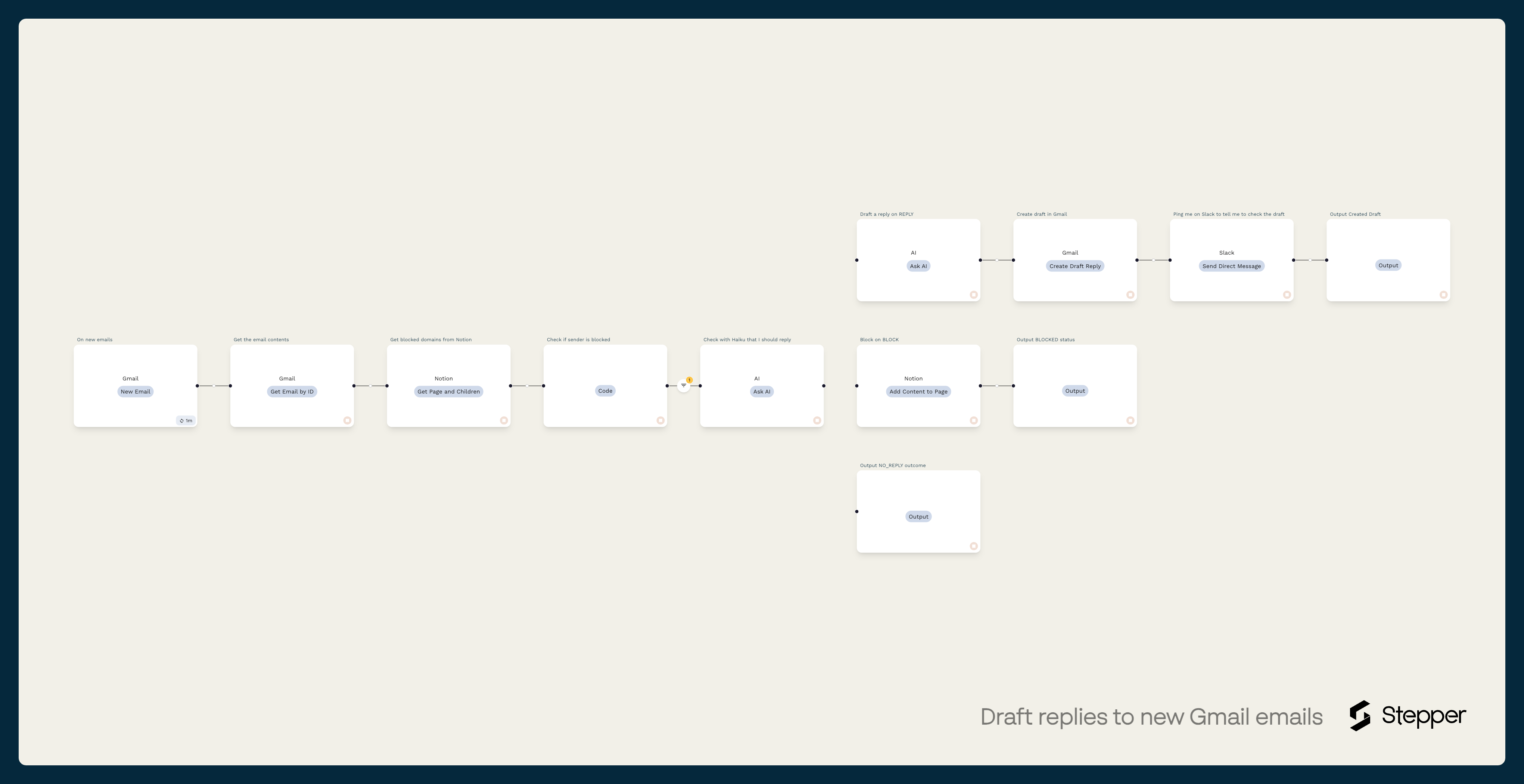
A simple email and Slack notification automation built with Stepper
If you're evaluating integration platforms, our guide to choosing a workflow automation platform breaks down what to look for.
The Hands: APIs
APIs carry out the actions. The integration platform uses them to execute each step:
- Slack API → posts a lead summary to #sales
- HubSpot API → creates a contact and assigns a rep
- Google Calendar API → books a demo the lead requested
The full cycle: Data in → AI thinks → platform connects → APIs act.
The Core Technologies Powering AI Workflows
| Technology | What it does | Example |
|---|---|---|
| Natural Language Processing (NLP) | Reads and understands human language | Analyzing a support email for sentiment and intent |
| Machine Learning (ML) | Learns from data to spot patterns and predict outcomes | Scoring leads based on historical conversion data |
| Computer Vision / OCR | Extracts information from images and documents | Pulling line items from a scanned PDF invoice |
| Intelligent Document Processing (IDP) | Combines OCR + NLP to understand document meaning, not text alone | Matching invoice fields to purchase orders regardless of layout |
| Predictive Analytics | Forecasts future outcomes from current data | Flagging likely customer churn before it happens |
Task Automation vs. AI Workflow Automation: What's the Difference?
Traditional task automation is like a vending machine. You press a button and get a predictable result, every time. AI workflow automation is more like a skilled assistant who can read the situation, make a judgment call, and take the best course of action without being told exactly what to do.
Traditional automation tools are fantastic at what they do, but they're rigid. They need perfectly structured inputs, they follow a fixed script, and the moment something unexpected happens (a weirdly formatted email, a field left blank, a new edge case) they break. AI workflow automation handles that variability. It can read unstructured data like plain-text emails or messy PDF invoices, understand what's being asked, and decide the right next step on its own.
Here's how the two approaches compare across the dimensions that matter:
| Traditional Task Automation | AI Workflow Automation | |
|---|---|---|
| How it works | Fixed IF/THEN rules | AI reasoning + judgment |
| Data it handles | Structured only (form fields, spreadsheet rows) | Structured + unstructured (emails, PDFs, chat messages) |
| Decision-making | None, follows the script exactly | Analyzes context, scores, classifies, routes |
| When something unexpected happens | Breaks or stops | Adapts and handles variations |
| Learning | Static forever | Improves over time with machine learning |
| Content generation | Cannot create new content | Drafts emails, summaries, social posts |
| Best for | Simple, repetitive, predictable tasks | Complex, judgment-based, multi-step processes |
The shift here is significant. AI workflow automation doesn't automate individual actions. It automates the decisions between those actions, which is where the real operational bottleneck lives for most teams.
How AI Workflow Automation Compares to Other Automation Types
AI workflow automation doesn't exist in a vacuum. It sits alongside several other automation approaches that have been around for years. The terminology can get confusing fast, especially since vendors love to blur the lines between categories. Here's a quick breakdown of how AI workflow automation relates to the other types you'll come across, so you know what each one does and where it fits.
| Type | What it does | Intelligence | Best for |
|---|---|---|---|
| RPA (Robotic Process Automation) | Mimics human clicks and keystrokes on screen | None, follows a recorded script | Legacy systems without APIs |
| iPaaS (Integration Platform as a Service) | Connects apps and syncs data between them | None, moves data, doesn't interpret it | Simple app-to-app data transfers |
| BPA (Business Process Automation) | Redesigns and automates end-to-end business processes | Minimal, mostly rule-based routing | Structured, high-volume processes |
| AI Workflow Automation | Connects apps + uses AI to reason, decide, and generate | Full: NLP, ML, predictive analytics | Complex, judgment-based, multi-step work |
| Hyperautomation | Combines all of the above into a unified strategy | Varies by component | Enterprise-wide digital transformation |
AI Workflow Automation Use Cases by Department
Here's where it gets practical. Each use case below is a workflow you can build today.
Sales: Lead Qualification Engine
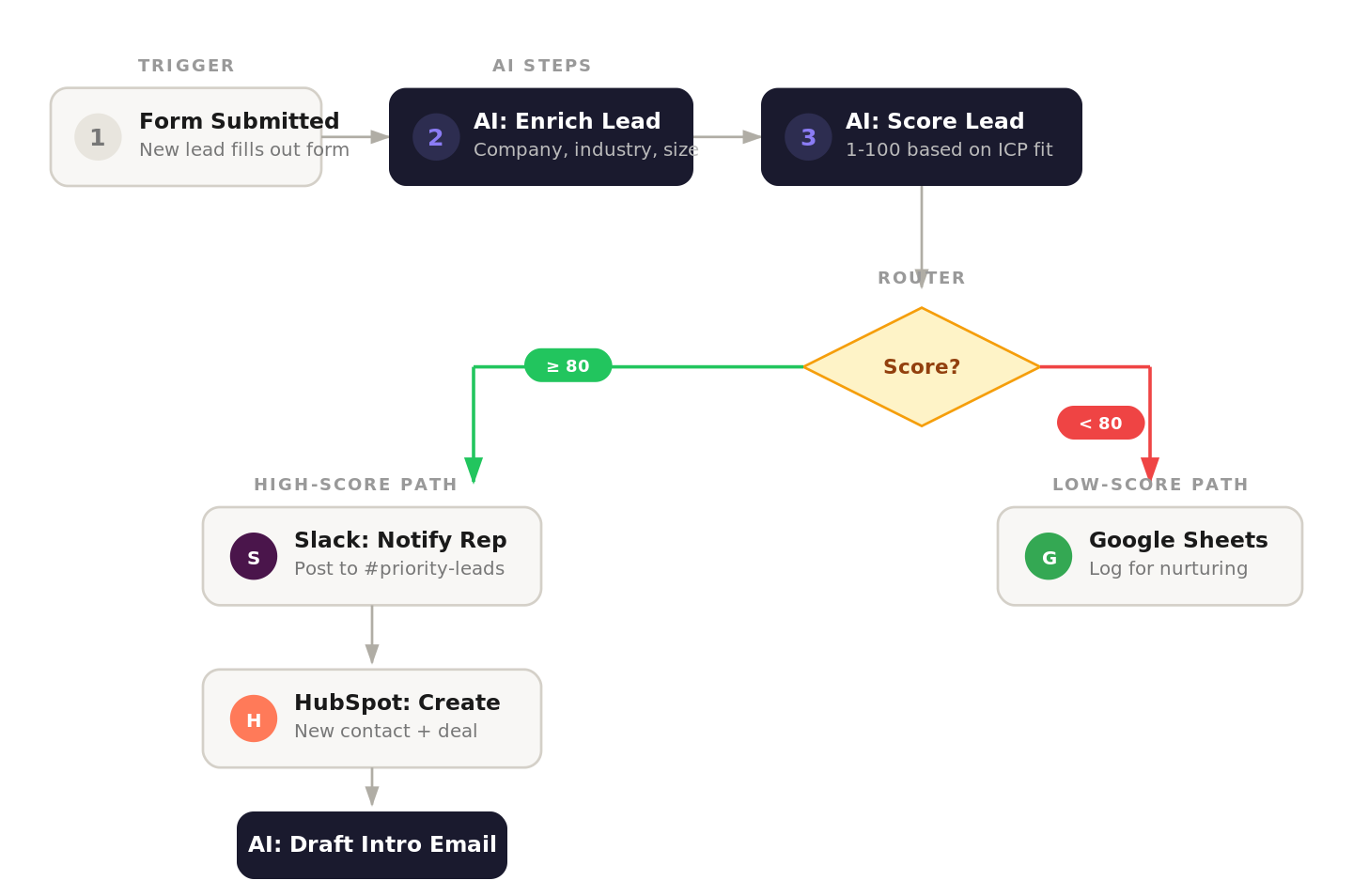
The instant someone fills out a demo request, you can create an automation that enriches, scores and routes lead to a new direction based on their score. For example:
- Enrich. AI pulls company size, industry, and funding data via API.
- Score. AI compares the lead against your ideal customer profile, assigns a score (1–100).
- Route based on score:
| Score | Action |
|---|---|
| 80+ | Create deal in HubSpot → assign to enterprise rep → ping #priority-leads in Slack |
| 40–79 | Add to email nurture sequence automatically |
| Under 40 | Tag for quarterly check-in campaign |
Then, based on their score, you can set up 3 different outreach emails personalised to the leads. For example, for 80+ leads, AI writes a personalized intro email referencing their industry. Rep reviews and sends. The result is that reps talk to qualified leads within minutes, not hours. There is no manual research or no leads falling through cracks.
Marketing: Content Distribution Pipeline
Imagine your team published a blog post. Normally, what follows is hours of work: pulling quotes, writing unique posts for every social platform, drafting an email announcement, chasing approvals, and scheduling everything. AI workflow automation can handle that entire cascade the moment the post goes live.
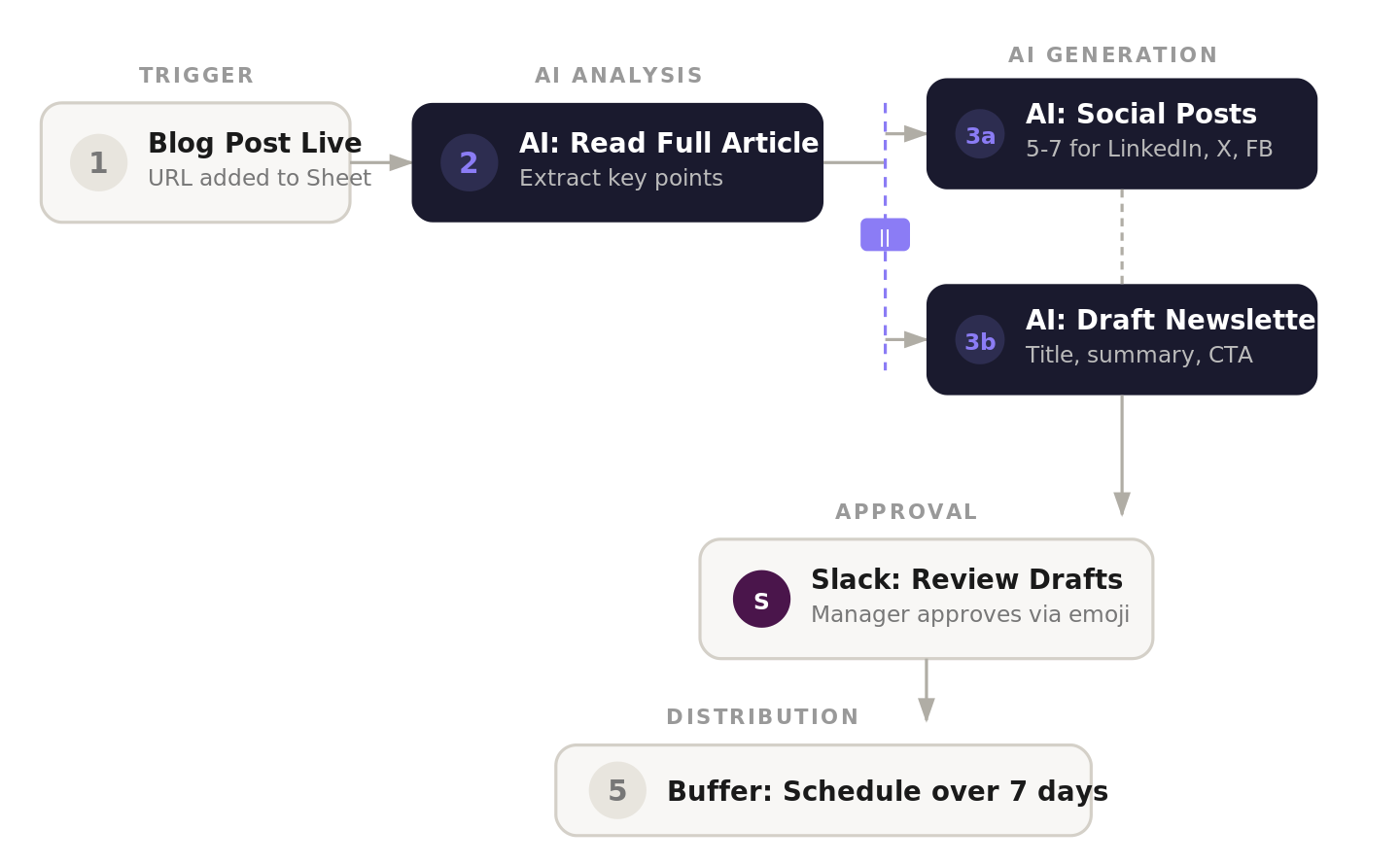
Here's how it works. The workflow triggers when a new post appears in your CMS or when someone adds a URL to a Google Sheet. The AI reads the full article, extracts the key points, and drafts 5–7 unique social media posts tailored for LinkedIn, X, and Facebook, each one adapted to the tone and format of that platform. At the same time, it drafts a newsletter email with the blog title, a short summary, and a call to action.
Those drafts don't go out automatically. They land in your team's #marketing Slack channel, where a manager can preview them and approve with a simple emoji reaction. Once approved, the workflow pushes the posts to a scheduler like Buffer or Hootsuite, spacing them out over the next week at optimal times.
What used to be a multi-day process now happens in about 30 seconds. Your marketing team gets to spend its energy on strategy and creative thinking instead of copying and pasting across platforms.
Customer Support: AI Ticket Triage
Support teams are constantly buried under incoming requests, and the triage process (reading every email, figuring out what it's about, deciding who should handle it) eats up a huge chunk of the day. An AI workflow can act as a smart dispatcher that automates repetitive tasks such as sorts and routes tickets before a human ever has to look at them.
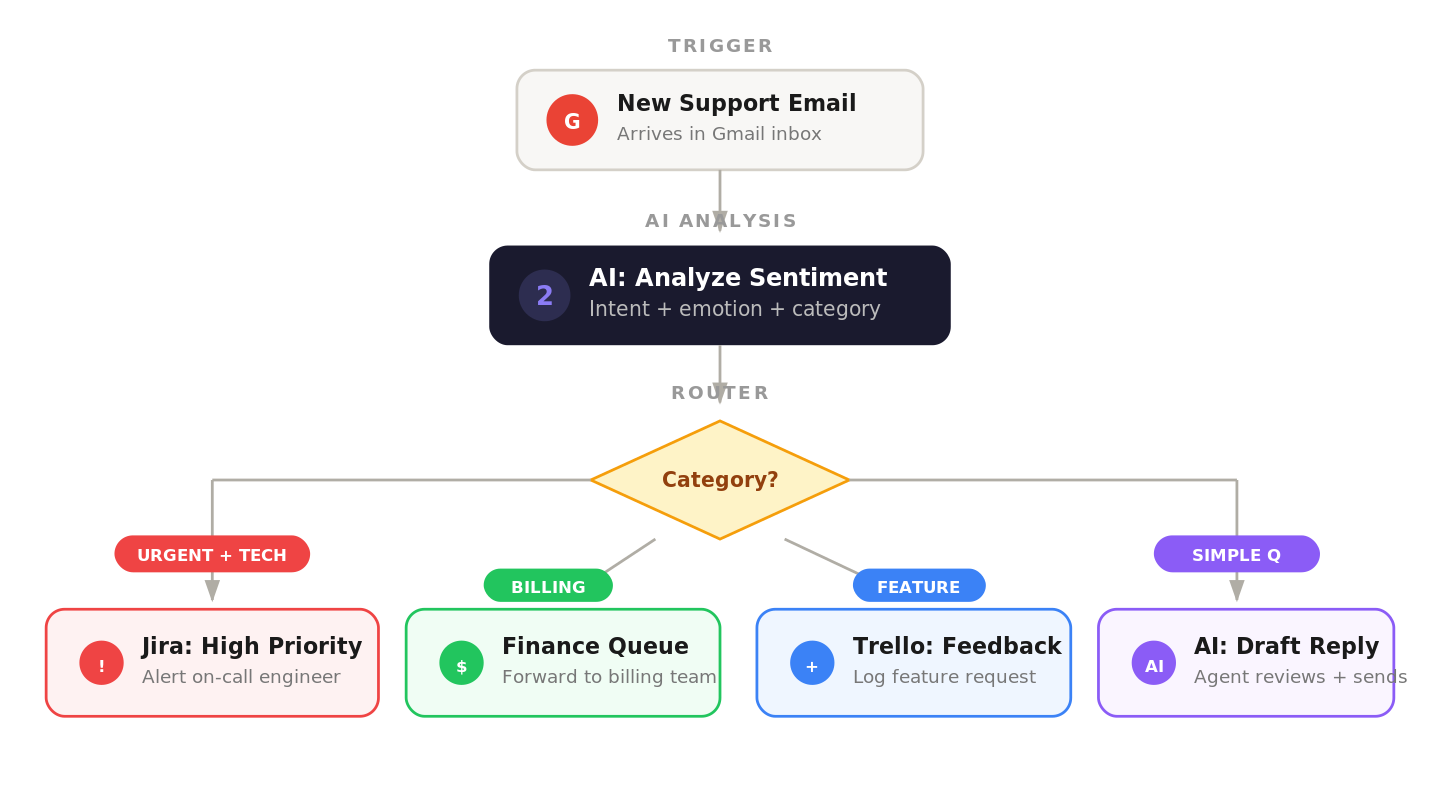
When a new email hits your support inbox, the workflow pulls out the sender's info, subject line, and body text. Then the AI reads the message to determine two things: the customer's emotional state (are they frustrated, neutral, or happy?) and what they're writing about (a billing issue, a technical bug, or a feature request).
Based on those findings, the workflow takes action automatically. A frustrated customer reporting a critical technical problem gets escalated immediately. The system creates a high-priority ticket in Jira and alerts the on-call engineering team. A billing question gets forwarded straight to the finance department's queue. A feature idea gets logged on a product feedback board in Trello. And for simple, common questions, the AI drafts a response that an agent can review and send with one click.
The result is that response times drop from hours to seconds. Customers are happier, agents are less overwhelmed, and your whole support operation runs more smoothly.
Finance: Invoice Processing
Finance departments often feel like they're drowning in paperwork. Typing data from invoice PDFs into accounting software by hand isn't tedious. It's a breeding ground for expensive mistakes.
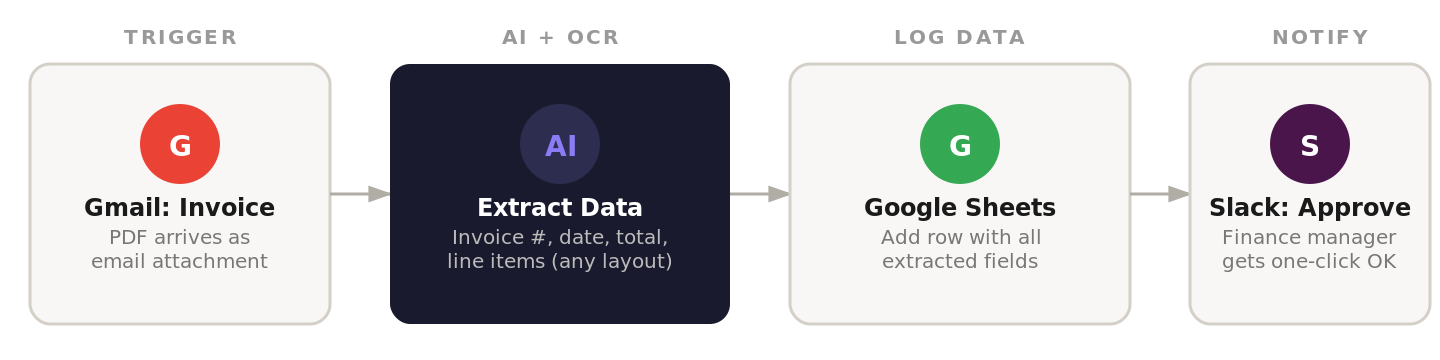
An AI workflow can put an end to that. When an invoice arrives as a PDF attachment in a dedicated Gmail inbox, the workflow kicks in. An AI step using Optical Character Recognition (OCR) reads the PDF and pulls out the key details (invoice number, date, total amount, and line items) even if every vendor uses a completely different layout. The workflow then adds this information to a new row in a Google Sheet, creating a clean, real-time log of every invoice that comes in. Finally, it sends a Slack message to the finance manager with the extracted details and a link to the original invoice, so they can approve it with one click.
This single automation eliminates hours of manual data entry every week and keeps your financial records accurate.
Operations: Inventory Management
A smooth-running supply chain is the bedrock of any profitable product business, and yet inventory management is one of those areas that still runs on spreadsheets and gut instinct in most companies. Someone checks stock levels manually, realizes you're running low on a bestseller, scrambles to place a purchase order, and hopes it arrives before you run out.
AI workflow automation flips this from reactive to proactive. An AI-driven workflow can connect directly to your sales data, warehouse management system, and even external signals like seasonal trends or market shifts to monitor stock levels constantly and act before problems happen. For example, AI connects to your sales and warehouse systems to:
- Predict demand by analyzing past sales, trends, and seasonal patterns
- Auto-generate purchase orders when stock is predicted to drop below safety thresholds
- Route POs for approval to the right manager with one-click sign-off
This prevents stockouts, avoids overstocking, and frees your ops team from spreadsheet monitoring.
AI Workflow Automation by Industry
The use cases above are organized by department, but it's worth noting that different industries tend to lean on AI workflow automation in very different ways. An e-commerce company's biggest win might be building an automation to forecast demand or abandoned cart recovery, while a SaaS business gets the most value from lead scoring and churn prediction. Here's a snapshot of the most common use cases and the AI capabilities that power them across six industries:
| Industry | Top use cases | Key AI capability used |
|---|---|---|
| E-commerce | Inventory forecasting, order status updates, abandoned cart follow-ups, product review analysis | Predictive analytics, NLP |
| SaaS | Lead scoring, trial-to-paid nurture sequences, churn prediction, feature request categorization | ML scoring, sentiment analysis |
| Professional Services | Proposal generation, time tracking summaries, client onboarding workflows, invoice processing | IDP, content generation |
| Healthcare | Patient intake form processing, appointment scheduling, insurance verification, referral routing | OCR/IDP, rule-based + AI routing |
| Real Estate | Lead qualification from listing inquiries, contract data extraction, showing scheduling, market report generation | NLP, document processing |
| Agencies | Content repurposing across channels, client reporting, project status updates, brief-to-deliverable workflows | Content generation, NLP |
What to Look For in an AI Workflow Automation Tool
Not all platforms are equal. Many legacy tools bolted AI on as an afterthought. Look for platforms that are AI-native, built with intelligence at the core, not tacked on.
Six features that separate AI-native platforms from legacy tools
| Feature | Why it matters |
|---|---|
| Conversational builder | Describe workflows in plain English → AI generates the first draft. No code required. |
| Visual drag-and-drop editor | Fine-tune the AI's output, rearrange steps, add conditions. Anyone can use it. |
| Reusable components | Build logic once (e.g., "enrich a lead"), save it as a block, reuse across all workflows. |
| Deep integrations | Must connect to your stack, not logos on a page. Check depth: can it search records, update fields, create items? |
| Intelligent error handling | Auto-retry failed steps, send alerts, run fallback workflows. Older tools fail silently. |
| Ready-to-use templates | Pre-built workflows for common tasks (invoice processing, lead scoring, content distribution) to get started fast. |
Our breakdown of the best workflow automation tools compares how major platforms stack up across these features.
Three questions to ask before you commit
- Who can build? Can your marketing manager create a workflow without calling IT? If no, it's a legacy tool.
- How does AI factor in? Is AI another action step, or does it help build the workflow itself?
- What will it cost at scale? Beware task-based pricing that explodes as you automate more processes. Look for flat-rate plans or credit systems. Bonus: platforms that let you bring your own API keys (e.g., OpenAI) give you direct cost control.
Limitations and Challenges
AI workflow automation is powerful, but it's not magic. Before you dive in, it's worth understanding where things can go wrong so you can plan around them.
The first and most common issue is data quality. AI is only as good as the data it receives. If your CRM is full of duplicates, outdated contacts, or inconsistent formatting, your automated workflows will inherit those problems. It's worth cleaning up your data sources before you start automating on top of them.
Then there's the risk of AI hallucination. Large language models can generate content that sounds perfectly reasonable but is factually wrong. For internal tasks like categorizing tickets or summarizing meetings, this is manageable. But for anything customer-facing (emails, chat responses, proposals) you should always keep a human review step in the loop.
It's also tempting to over-automate. Not every process should be handed to a machine. High-stakes decisions like hiring, legal sign-offs, or major financial approvals need human judgment. Automation should handle the repetitive groundwork so that people can focus on these critical decisions, not replace the decisions themselves.
Change management is another common stumbling block. Even the best workflow is useless if your team doesn't trust it or use it. The fix is to start with quick wins that save people obvious time and frustration, rather than rolling out a top-down automation mandate that feels threatening.
Finally, watch out for vendor lock-in. Choose platforms that offer open integrations and let you export your data and workflow logic. You don't want to build dozens of workflows on a platform only to discover you can't leave without rebuilding everything from scratch.
The good news is that the fix for most of these is the same: start small, keep humans in the loop for critical decisions, and iterate based on real results.
How to Get Started (Step by Step)
Getting started with AI workflow automation can feel like a big undertaking, but it doesn't have to be. The biggest mistake people make is trying to automate their most complex, cross-departmental process right out of the gate. That's a recipe for frustration. The better approach is to start small, get a win on the board, and build momentum from there.
Step 1: Pick a quick win
Look for a task that's repetitive, follows a predictable script, and eats up a surprising amount of your team's time. These are your low-hanging fruit, the tasks everyone dreads and that are notorious for errors.
A perfect first project could be automatically summarizing your recorded meetings and posting the notes to a Slack channel, extracting invoice data from PDFs and logging it in Google Sheets, or enriching new leads with company data and routing them into your CRM. The key is choosing something with a clear, measurable "before and after."
Step 2: Set your baseline
Before you build anything, document how the process works right now. How many hours does it take from start to finish? What's the rough labor cost for those hours? How often do mistakes pop up that someone has to fix? This "before" picture is the foundation of your entire ROI calculation. Without it, you'll have no way to prove the automation is working.
Step 3: Build it
This is where it gets fun. In a platform like Stepper, you describe what you want in plain English, e.g. something like "When a new invoice PDF arrives in Gmail, extract the key data and add it to a Google Sheet, then notify the finance team on Slack." The AI takes that description and generates a first draft of the workflow. From there, you switch to the visual editor to fine-tune the details, connect your apps, and test it with real data. It's one of the fastest ways to automate repetitive tasks that drain your team's time, and once you see how quickly the first workflow comes together, you'll start spotting opportunities to improve workflow efficiency across every department.
Step 4: Test, measure, iterate
Once your workflow is built, run it a few times with real data. Iron out the kinks and make sure it behaves exactly as expected. Then start tracking its performance against the baseline you set in step two.
The metrics that matter most are process cycle time (how much faster is the task now?), cost savings per task (translate the time saved into dollars using the labor costs from your baseline), error rate reduction (how much have mistakes dropped?), and hours reclaimed (the total time your team gets back every week or month). This data is what you'll use to prove ROI and get buy-in for your next automation project.
Step 5: Scale with reusable components
This last step is where you unlock massive long-term value. Instead of treating each automation as a one-off project, turn the core logic you've built into a reusable component, a self-contained building block that anyone on your team can drop into future workflows without starting from scratch.
For example, if you built a "lead enrichment" flow that looks up company data from an email address, save it as a reusable block. The next time someone needs lead enrichment in a different workflow, they plug it in. This modular approach is how you scale from one automation to an entire library of standardized tools across your business, and our guide to low-code process automation covers how to do this effectively.
Measuring ROI
Saying things are "more efficient" won't convince your leadership team or justify the investment. You need concrete numbers that show a real return.
A quick ROI calculation
The math is straightforward. Let's say your finance team spends 10 hours a week on manual invoice data entry at a loaded hourly wage of $30. That single task costs you $15,600 per year. If your automation platform costs $50 a month, you're looking at net savings of roughly $15,000 in year one, from one workflow alone.
Now apply that same calculation to every manual process you automate. The savings stack up fast, and most businesses find that the platform pays for itself within the first few weeks.
What the data says
The broader numbers back this up. Research shows that around 60% of companies see a positive ROI within 12 months of implementing AI workflow automation. Businesses report 42% faster process execution on average, and accounting departments alone are saving an average of 18 hours per week through automated invoice processing. Across teams, companies are seeing productivity boosts of around 25%.
Source: Thunderbit automation statistics
The intangible wins matter too
Beyond the hard numbers, there are benefits that don't show up on a spreadsheet but make a real difference to your business. When you remove repetitive, draining tasks from your team's workload, morale goes up. People are happier when their skills are being put to use. Your team gets the mental bandwidth for strategic thinking and innovation, instead of spending their days copying data between systems. Customer satisfaction improves because service becomes faster and more accurate. And early adopters of AI workflow automation often gain a roughly six-month head start on operational efficiency over competitors who wait, which translates directly into a stronger market position.
Frequently Asked Questions
What skills do I need to use an AI workflow automation tool like Stepper?
None beyond being able to explain your process. Stepper uses a conversational editor so you describe what you want in plain English and the AI builds the workflow. No coding or developer needed.
How is Stepper different from Zapier?
Zapier is great for multi-step, linear IF/THEN connections between two or more apps. Stepper adds AI reasoning on top: it can interpret data (analyze email sentiment), make decisions (route tickets by urgency), and generate content (draft personalized emails). It also uses a conversational builder and supports reusable components for scaling. Our best workflow automation tools guide has a detailed comparison.
What is the best AI workflow automation tool?
It depends on your needs. For SMBs that want an AI-native platform with a conversational builder, deep integrations, and a free plan, Stepper is purpose-built for this. For open-source flexibility, n8n is strong. For mulitple-step automations, Zapier still works fine.
What does it cost?
Many platforms have free plans. Paid tiers typically use credit-based pricing that scales with usage. Some tools also let you bring your own API keys for AI services like OpenAI, so you control costs directly. The cost of not automating, in wasted hours and errors, is almost always higher.
Is my business data secure?
Look for: end-to-end encryption (in transit and at rest), SOC 2 and GDPR compliance, OAuth2 authentication (no raw passwords shared), and granular access controls (who can view/edit workflows). Top platforms also use offline AI models to mask sensitive data before it leaves your system.
Will AI automation replace employees?
No. The goal is augmentation e.g. automating the repetitive work nobody enjoys (data entry, email sorting, report pulling) so your team can focus on strategy, creative work, and customer relationships.
How fast will I see results?
Pretty much immediately. Automate one high-frequency task and you'll free up hours in the first week. Full ROI typically lands within 12 months, but the productivity gains are visible from day one.
Which processes should I automate first?
Look for tasks that are repetitive, follow a predictable pattern, high-volume, and prone to human error. Classic starting points are usually automating invoice processing, lead enrichment, customer support ticket routing, and content distribution through social media automation.
Key Terms Glossary
| Term | Definition |
|---|---|
| AI Workflow Automation | Using artificial intelligence to run multi-step business processes end-to-end: reading data, making decisions, and taking action across apps without human intervention |
| LLM (Large Language Model) | The AI model (e.g., GPT, Claude) that powers the "thinking" in AI workflows: understanding language, generating content, and making decisions |
| NLP (Natural Language Processing) | AI technology that reads and understands human language, enabling sentiment analysis, text classification, and content generation |
| OCR (Optical Character Recognition) | Technology that converts images of text (scanned documents, photos) into machine-readable data |
| IDP (Intelligent Document Processing) | Combines OCR + NLP to not read text from documents but understand its meaning and context regardless of layout |
| ML (Machine Learning) | AI systems that learn from historical data to improve predictions and decisions over time without being explicitly programmed |
| API (Application Programming Interface) | The communication layer that lets one software application tell another what to do, the "hands" that carry out workflow actions |
| RPA (Robotic Process Automation) | Software bots that mimic human clicks and keystrokes to automate tasks on screen, without AI intelligence |
| BPA (Business Process Automation) | The broader practice of redesigning and automating end-to-end business processes, which may or may not include AI |
| iPaaS (Integration Platform as a Service) | Cloud platforms that connect different software applications and sync data between them, the "plumbing" without the intelligence |
| Hyperautomation | An enterprise strategy that combines RPA, AI, BPA, and other tools to automate as many processes as possible across an organization |
| Reusable Component | A self-contained piece of workflow logic (e.g., "enrich a lead") that can be saved once and dropped into any future workflow |
| Conversational Builder | An interface where you describe a workflow in plain English and the AI generates it, no code or drag-and-drop required |